Who should own your AWS bill, and what each option costs
Native AWS cost tools, third-party FinOps software, an engineer's time and outside help buy different parts of the job. Published prices for each, and how to choose.

The AWS bill lands in a board deck for the first time, and the question that follows is never "what is this line item?" ...
It is: "Who owns this?"
Nobody in the room wants to say their own name, since owning the bill sounds like a second job on top of the one they already have.
They are right about that, and the fix is to decide what kind of help you are buying.
There are four options:
- the cost tools AWS already includes,
- a third-party product,
- part of an engineer's week, or
- someone from outside.
By the end of this you will know what each costs and what each one does and doesn't do for you. Most companies end up with two of them.
First, the thing that makes the comparison tricky. Managing a cloud bill is really two jobs wearing one hat.
The first job is seeing where the money goes, broken out by team, product and environment, early enough that you can still do something. The second job is changing things: resizing a server, deleting what nobody uses, buying a discount, rewriting the part of the system that is expensive by design.
Tools are excellent at the first job. Only people do the second. Keep that split in mind and the four options stop looking like four prices for the same product.
1) What AWS already gives you for free
The pleasant surprise is how cheap this is. Most teams assume that seeing their own spend clearly is something they have to buy. For the basics, it isn't.
The Cost Explorer console, the built-in screen where you slice your bill by service and month, is free to use. AWS Budgets will watch a number for you and email you when you cross it, also free to monitor. Cost Anomaly Detection is the smoke alarm. It learns your normal pattern and shouts when spend jumps, and it is on by default for new Cost Explorer accounts at no cost.
Then there is Compute Optimizer, which does rightsizing. Rightsizing just means noticing you rented a van to carry a bicycle, and swapping it for something smaller. There is no extra charge for those recommendations, and Cost Optimization Hub collects them into one list alongside suggestions to buy a discount.
So where does AWS start charging? In the one place people don't think to look.
The bill you can accidentally write yourself
Someone on the team decides the free console isn't enough and builds an internal dashboard. Reasonable instinct. The trap is that the console is free, but the Cost Explorer API behind it is not. It costs $0.01 every time a program asks it a question, which sounds like nothing until you notice how often software asks questions.
That is all there is to it. A human clicking around costs nothing. A script calling GetCostAndUsage on a timer bills a cent a go, forever, and the total depends entirely on the refresh interval someone typed into a config file months ago.
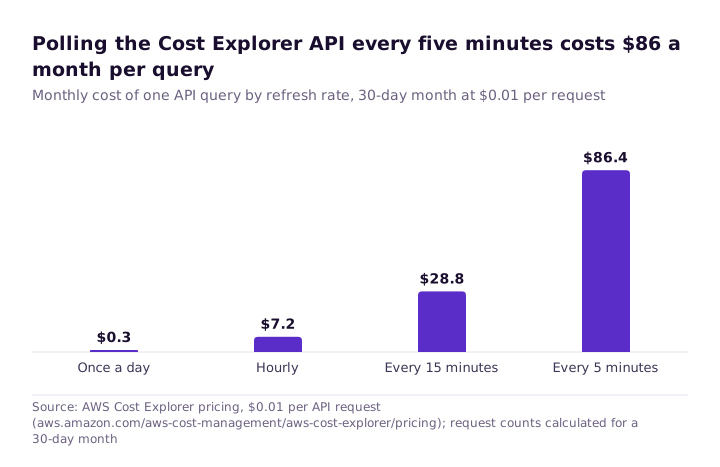
That last detail is the one that stings. The underlying data only updates about once a day, so a dashboard refreshing every five minutes is paying over and over for an answer that hasn't changed.
None of this is an argument against the API. It is an argument for storing the answer and asking again tomorrow, and for checking the Cost Explorer line on your own bill once, to see whether this is already happening to you.
Where the free tools run out
Now the real limitation (it's not price). Say your CFO asks which of your biggest customers is the expensive one to serve. The native tools will cheerfully tell you that you spent a lot on databases. Mapping that to a customer is a different question, and they can't answer it out of the box.
That gap is called allocation, which means splitting one shared bill across the teams, features or customers that caused it. Think of a long group dinner where everyone wants their own share worked out, rather than splitting the total evenly.
Getting there takes one of two paths. You apply cost allocation tags consistently, which are just labels you stick on each resource saying who it belongs to. Or you pull the raw line items out with Data Exports and build your own query layer on top. Both work, and both are ongoing work rather than a weekend project.
2) Paying a FinOps tool to do the allocation for you
This is the gap third-party products are built for. FinOps, by the way, just means engineers and finance managing cloud spend together, instead of a bill that arrives as a surprise.
These products mostly sell you that allocation layer, done for you, plus one view across several clouds and sometimes your SaaS bills too. Many also break down Kubernetes, the system that packs lots of small workloads onto shared machines, which makes working out who used what unusually hard. What matters almost as much as the price is the shape of the price, since the shape decides what happens as you grow.
- You pay for the spend you track. Vantage publishes its tiers openly, and a company with about $20,000 a month of cloud spend sits on a $200 a month plan. That is predictable, and easy to weigh against the cost of building the same reports yourself.
- You pay a cut of what you save. ProsperOps automates buying your discounts and takes a percentage of the savings it finds, rather than of your spend. The incentive points the same way yours does. Settle up front on how "savings" gets measured, since that definition is the entire deal.
- You pay with your own time. OpenCost is open source and allocates Kubernetes costs right down to the individual container. Free to run, and somebody on your team runs it.
Before signing anything, I would ask three questions. What AWS permissions does it need? Can it change things in my account, or only read them? And if we leave in two years, what happens to our history?
3) Giving the bill to an engineer you already have
This is the option that looks free, which is exactly why it deserves the closest look. Nobody raises a purchase order, so nobody counts the cost. It is still a cost.
Put a number on it. The US Bureau of Labor Statistics puts the median wage for software developers, QA analysts and testers at $64.44 an hour. One day a month of someone's attention is therefore about $516 in wages, before benefits and overhead, and considerably more if that person would otherwise have been shipping the product.
So what does a day a month actually buy? Enough to read the bill, work through the anomaly alerts and Cost Optimization Hub, and keep the tags honest. That is valuable, and for a lot of companies it is the right answer.
It is not enough for the heavy lifting, like moving a workload somewhere cheaper, or modelling whether a three-year Savings Plan is wise. A Savings Plan is a bit like a gym membership. Commit to paying for a year or three and the rate drops, whether or not you turn up.
And this work never finishes. The FinOps Foundation's State of FinOps 2025 survey found that cutting waste was still a top priority for half the practitioners it asked. Those are mostly big organisations with dedicated teams. If people who do this full time haven't run out of work, nobody is finishing it in the gaps between sprints, so write it into someone's job rather than squeezing it around the edges.
4) Bringing in someone from outside
Outside help comes in two flavours, and they are less similar than they look.
The first is AWS itself. Business Support+ is priced as a slice of your bill, starting at 9% of the first $10,000 of monthly charges and sliding down as you spend more. For that you get round-the-clock technical support and the full set of Trusted Advisor checks, which is AWS auditing your own account for waste and risk. Be clear-eyed about it, though. You are buying support, and cost review comes along for the ride.
The second is consultants and partners, who don't publish comparable prices. So compare the structure instead, since the structure tells you what you will get.
- A fixed-scope review. A known cost and a written list of findings. Clean, finite, and it stops when the document lands.
- A retainer. Ongoing attention, which is only worth paying for if someone on your side actually acts on what comes back each month.
- A share of savings. Rewards the cuts you can measure, which tends to push toward discounts and rightsizing rather than the slower architectural work that doesn't show up neatly.
Whoever you bring in, start them read-only. Give access through a role, which lets you hand over a key you can take back, with policies such as AWSBillingReadOnlyAccess and ViewOnlyAccess. Then ask for their changes as code your own team can read and keep, so the improvements don't walk out the door with them.
What this looks like at $20,000 a month
Abstractions are hard to compare, so picture one company: $20,000 a month on AWS, 50 instances running. This is what each option costs at that size. It is a price list, not a ranking.
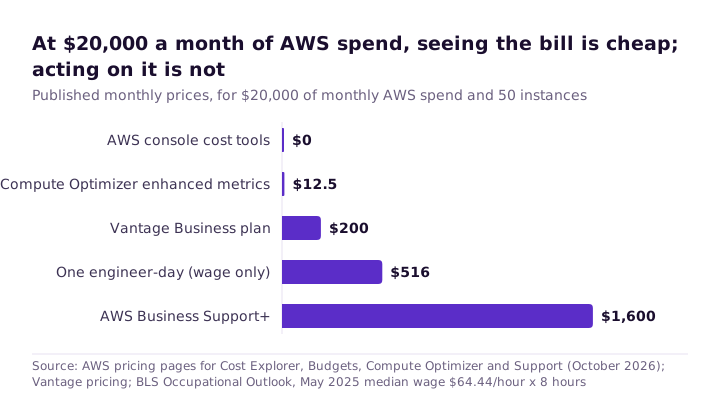
The ranking is not the point. The cheap bars tell you where the money went, and only one bar actually moves anything, since only one of them is a person with permission to act.
Which combination fits you depends mostly on how messy your allocation problem is:
| Your situation | What usually fits | What to watch |
|---|---|---|
| Small bill, one account, few teams | Native tools and a named owner | API calls from homemade dashboards |
| Spend spread across teams or customers you need to bill back | A third-party tool, or tags plus Data Exports | Pricing tiers as spend grows |
| Kubernetes is most of the bill | OpenCost or a tool with container allocation | Who runs it |
| Steady compute with little commitment coverage | Savings Plans, modelled in-house or automated | How savings are measured |
| Nobody internal has time or the AWS depth | Outside help with a defined scope | Access, and who keeps the changes |
Four things to do this week
Open Cost Explorer and have a proper look. Check that Cost Anomaly Detection has a monitor switched on and that its alerts land in front of an actual human, not a channel nobody reads. Set one AWS Budget at a number that would make you sit up. Then scan last month's bill for Cost Explorer API request charges, to find out whether a dashboard has been billing you without anyone noticing.
Then do the part that isn't technical, and write one person's name next to the bill. Every option above, including the expensive ones, assumes somebody on your side owns the number. Without that name, a tool is just a nicer-looking bill.