SOC 2 controls that fail most often, and how to set them up on AWS
Auditor benchmarks show most SOC 2 exceptions come from access reviews, leavers and change approvals. Here is the AWS configuration that makes each one automatic and leaves evidence behind.

Some finding catches almost everyone in their first SOC 2 report: "the quarterly access review didn't happen in the second quarter."
No breach, no broken server ...
Just a calendar item everyone thought somebody else owned.
That is what most audit failures look like. So this post covers which controls fail most often, and how to set up AWS so they either run themselves or leave their own paper trail.
First, two bits of audit vocabulary. A "control exception" is the auditor finding one case where the thing you promised to do didn't happen. A "qualified opinion" is worse. It means the auditor could not sign off cleanly, and your buyer's security team will read that line first.
The audit firm CBIZ read 193 SOC reports for its 2024 SOC Benchmark Study. It found that 54.9% of reports had at least one control exception and 10.9% carried a qualified opinion. So about half of all reports pick up a finding. Roughly one in ten gets the serious version.
And what caused them? Mostly routine work that didn't happen on time. The top four were approvals and reviews, user access reviews, leavers whose access was never removed, and change management. Failed access reviews had become the single leading reason for a qualified opinion.
KPMG's UK practice saw the same thing across more than 400 reports. Look at where access controls land in its SOC Reporting Benchmarking 2024. They were a small slice of what got tested, and a much bigger slice of what failed:
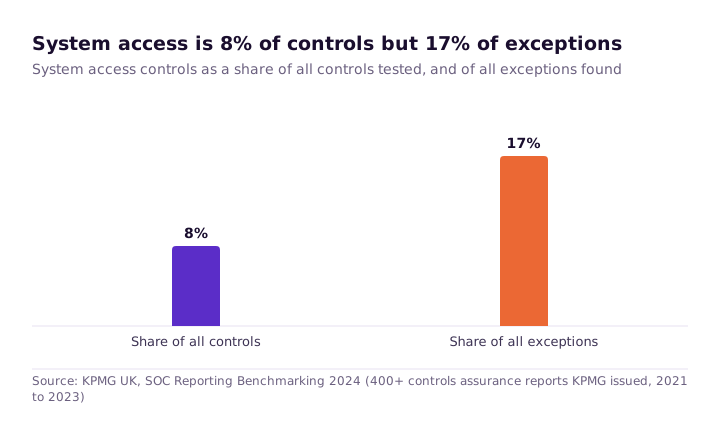
That gap is good news, in a way. If the controls that fail are mostly steps a human forgot, then setup can do much of the work for you. Here are the ones I would look at first.
Why leavers keep their access
Someone resigns. HR disables their email on the Friday. Three months later the auditor asks for proof their AWS access went away too, and nobody can find any.
The auditor will pick a sample of people who left during the audit period. For each one, you must show their access went away inside the window your own policy promises. It usually fails for one reason. AWS access was never wired up to the system that knows who still works there.
That system is your identity provider: the one place that holds everyone's login. Google Workspace, Microsoft Entra ID and Okta are the common ones. Trouble starts when AWS access sits outside it, as separate "IAM users". An IAM user is a login made directly in AWS, with its own password and keys, that only AWS knows about.
These are still everywhere. Datadog's State of Cloud Security 2025 found that 39% of firms still use IAM users in some form. About one in five rely on them alone. That last group has no central off switch at all.
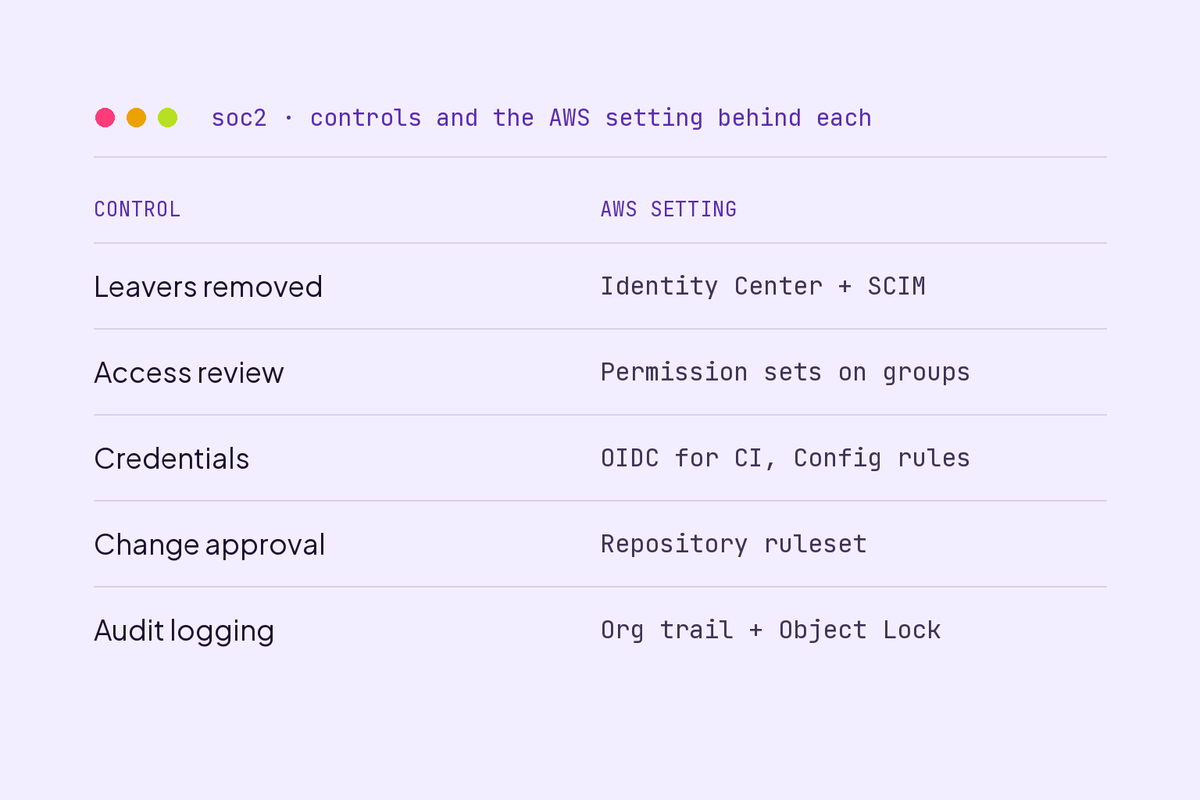
The fix is to make your identity provider the only door. Move people to IAM Identity Center and connect it with automatic SCIM provisioning. SCIM is just a standard way for that system to tell AWS "this person joined, this person left". Think of a hotel cancelling your key card at checkout, rather than hoping each door forgets you.
Now switching someone off in Okta takes their AWS access with it. Better still, the identity provider's own log becomes your evidence. No screenshots to remember. Once everyone has moved across, delete the old IAM users.
Access reviews nobody did, or did alone
Almost every policy promises a quarterly review of who can reach production. CBIZ found two ways that promise breaks. Sometimes the review was simply skipped. Sometimes it happened, but the person approving the access list was also on it.
Neither of those is a technical problem. But your setup decides whether the review takes twenty minutes or a grim afternoon. Guess which version gets skipped.
Identity Center helps because access becomes a short list. Instead of hundreds of separate policies, you get a handful of permission sets handed to groups. A permission set is a named bundle of rights, like "read-only on production", that you give to a group rather than a person.
Then the review itself is a small routine:
- Export the real list. Run
aws sso-admin list-account-assignmentsfor each account and permission set, and keep the raw output. - Attach it to a ticket. Add the IAM credential report too, which lists any IAM users you still have.
- Get an outside approver. Sign-off has to come from someone who is not on the list.
- Put it in a shared calendar. Name an owner and a backup, so a holiday doesn't become an exception.
One warning from the auditors cited above. Auditors now test whether the list you reviewed was complete. So keep the raw command output and the date you ran it. A tidied-up spreadsheet proves nothing about what you left out.
Access keys that outlive the person who made them
Somebody set up a build server three years ago and gave it an access key. An access key is a username and password for software, and it does not expire. The server still runs. The key has never changed. The person who made it has left.
SOC 2 expects credentials to be managed, and that key is hard to defend. It is also very common:
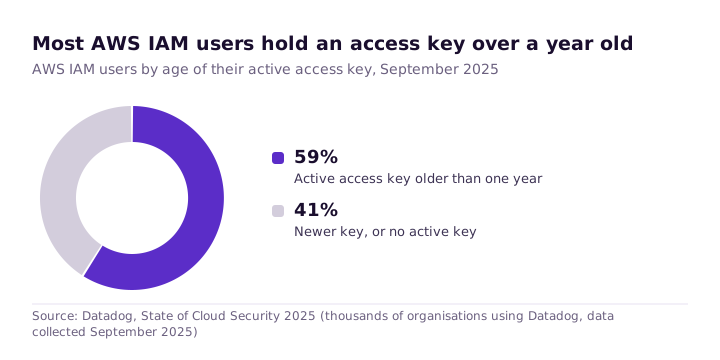
The better pattern is to stop storing keys at all. For your build pipeline, set up an OIDC identity provider in IAM. OIDC lets AWS trust a short-lived proof of identity from another system, so nothing permanent sits in your settings. Think of a visitor badge that works for one afternoon, not a copied office key.
GitHub Actions supports this directly and gets fresh credentials for each job. Anything running inside AWS should use a role instead. A role grants rights to the machine, so there is no secret to store.
Then make it hard to backslide. Turn on the AWS Config rules access-keys-rotated and iam-user-unused-credentials-check. A new long-lived key then shows up at once as non-compliant. IAM Access Analyzer will also flag access nobody is using.
Changes nobody approved
The auditor picks a few changes that reached production and asks one simple question. Who approved this? Two habits make it impossible to answer. One is pushing commits straight to the main branch. The other is fixing things by hand in the AWS console.
For code, a repository ruleset on the default branch solves it. Require a pull request, one approval from somebody other than the author, and passing checks. Your pull request history then is the evidence, which is the whole point.
For infrastructure, deploy through that same pipeline with Terraform or CloudFormation. Use permission sets to limit who can change production by hand. Console edits should be rare, not routine. When one does happen, CloudTrail records who did it, and your change policy should say how it gets approved after the fact.
Logging that only covers the regions you remembered
A common surprise: the trail was set up years ago in one region, and the team has since launched services in three more. Everything there is invisible.
What you need is a record of admin activity across the whole estate that nobody can edit without leaving a trace. Create an organization trail from your management account. It covers every account and every region for you, including accounts somebody sets up next year.
Then guard it from tampering. Turn on log file integrity validation, which lets you prove the logs were not changed. Write them to a bucket in a separate logging account with S3 Object Lock. Object Lock makes a file impossible to delete or overwrite for a set time. If you expect to answer questions from those logs, CloudTrail Lake lets you query them with SQL.
Do this one first. Every other control here starts leaving evidence the day you turn it on, and logging is what proves it did.
Open buckets and unencrypted disks
Turn on S3 Block Public Access at the account level. Datadog suggests locking that setting behind an SCP. An SCP is a rule for the whole org that not even an account admin can switch off. Then turn on EBS encryption by default in each region you use, so new disks are encrypted with nobody ticking a box.
To keep an eye on things after that, switch on Security Hub with the AWS Foundational Security Best Practices standard. Add GuardDuty to watch for odd activity.
Fair warning. That first list of findings will be long and a bit crushing. Start with production accounts that hold customer data. For the rest, write down why you accept the risk. At audit time a documented exception is a fine answer, where an unexplained one is not.
Backups nobody has ever restored
Your auditor will not ask whether backups run. They will ask when you last restored one. That is a much harder question.
AWS Backup restore testing runs restores on a schedule and records whether each one worked. Backup Audit Manager turns the results into reports. Together they turn a chore everybody avoids into a record that writes itself.
The evidence each control leaves
| Control | AWS or tooling setting | Evidence the auditor samples |
|---|---|---|
| Timely removal of leavers | Identity Center with SCIM from the identity provider | Offboarding ticket and identity provider log |
| Periodic access review | Permission sets assigned to groups | CLI export, reviewer sign-off by someone else |
| Credential management | OIDC for CI, roles for workloads, Config rules | Config compliance history, credential report |
| Change approval | Repository ruleset, deploys through the pipeline | Pull request approvals, CloudTrail for console changes |
| Audit logging | Organization trail, integrity validation, Object Lock | Trail configuration, validation output |
| Data exposure and encryption | Block Public Access with SCP, EBS default encryption, Security Hub | Security Hub findings and documented exceptions |
| Backup and restore | AWS Backup plans and restore testing | Restore test results, Backup Audit Manager reports |
None of this replaces the written policies, training records and vendor reviews SOC 2 also wants. It does cover the controls that most often go wrong.
What you can do this week
Download the IAM credential report and count how many users and keys are older than a year. Check that an organization trail exists and really does cover every region. Turn on Block Public Access at the account level.
Then book the first quarterly access review, with an owner and a second reviewer who is not on the list. That last one is the cheapest job here. By CBIZ's numbers, it is also the most costly to skip.